Free online · No sign-up · Pitch-locked tempo

Audio Speed Changer

Use this free online audio speed changer to set any speed from 50% to 200% while musical pitch stays fixed. There is no sign-up, payment, credit, or quota step. Preview, calculate a rate from known BPM values, loop a phrase, and export WAV without uploading your audio.

  • Free to use
  • No sign-up
  • Files stay local

Speed & BPM workspace

Pitch-locked preview · WAV export

Files stay local

Drop audio into the speed changer

Change timing while the musical pitch stays fixed. MP3, WAV, FLAC, M4A, AAC, or OGG up to 80 MB.

Three local steps

Choose a file, set speed, and preview before exporting.

  1. 1

    Load audio into the audio speed changer

    Choose one MP3, WAV, FLAC, M4A, AAC, or OGG file up to 80 MB. The audio speed changer asks your browser to decode the file locally. An empty, oversized, unsupported, or undecodable file stops before the workspace opens, and no audio upload is used as a fallback.

  2. 2

    Set speed or calculate it from BPM

    Set the audio speed changer from 50% to 200% with the slider or exact percentage. If you know the original and target BPM, enter both to calculate the rate. The calculator does not detect the song BPM.

  3. 3

    Preview, loop, and export a WAV

    Play the audio speed changer result with pitch lock active, seek on the waveform, or mark an A–B loop around a phrase. When the timing feels right, create a 16-bit WAV with the same Signalsmith rate and zero-semitone setting used for preview. Download the new copy while the source file remains unchanged.

What the tool shows and controls

Use speed, duration, and known BPM values to plan the timing change.

Audio speed changer range: 50% to 200%

At 50%, the audio moves at half the original rate and the exported duration is about twice as long. At 200%, it moves at double rate and the duration is about half as long. The audio speed changer shows percentage, multiplier, original duration, and estimated output duration together, so you can predict the timing result before rendering a large WAV.
Pitch lock with Signalsmith Stretch

The audio speed changer uses Signalsmith Stretch with pitch fixed at zero semitones. Slowing down preserves the original key, as does speeding up. Time stretching can still add artifacts, especially at extreme settings; preview exposed vocals and percussion before export.

BPM changer calculator without detection

When original BPM and target BPM are known, the audio speed changer calculates target divided by original. A move from 120 BPM to 90 BPM produces 75% speed. Values that imply less than 50% or more than 200% fail with a visible range message. The page never labels an estimate as detected BPM because it performs no tempo analysis.

Waveform seeking and A–B practice loops

Use the waveform to reach a chorus, lecture sentence, dance count, or difficult bar without replaying the complete file. The audio speed changer can jump five seconds, return to the beginning, repeat the track, or loop an A–B range of at least 0.25 seconds. Speed changes update on the existing processor while your working position remains continuous.

Practical workflows

Choose settings for practice, dance, speech, or transcription.

1

Slow down music practice while keeping the key

A musician can load a reference track, set the audio speed changer to 75% or 80%, and loop the difficult phrase. The slower timing makes individual notes and attacks easier to hear while the zero-semitone setting keeps the intended key. Increase speed in small steps as the passage becomes comfortable, then return to 100% for a final rehearsal check. If that copy also needs a new key, open Pitch Changer. If you are still choosing whether key, timing, or both should move, compare pitch and tempo before changing speed.

2

Match dance or fitness material to a target BPM

If choreography was prepared at one known BPM and class material needs another, enter both numbers in the BPM calculator. The audio speed changer converts that relationship into a supported speed percentage and updates the expected duration. Preview a section with clear beats before exporting, because perceived groove and counted tempo can depend on how the source was arranged.

3

Review lectures, interviews, and spoken audio

Use faster playback to review familiar speech or slower playback to catch an unfamiliar term. The audio speed changer keeps pitch processing independent from rate, avoiding the intentional chipmunk or low-voice effect produced by simple resampling. Mark an A–B loop around one answer when accuracy matters, and export a timed copy only when another app needs the changed duration.

4

Create transcription and rehearsal copies

Transcribers can slow a dense phrase, return five seconds, and repeat the same range while writing. Singers and instrumentalists can make a rehearsal WAV that preserves the selected key while changing pacing. The audio speed changer creates a separate download, records the change in the filename, and leaves the original compressed or uncompressed file untouched.

Practical checklist

Check detailed passages carefully when speed is far from 100%.

  1. 1

    Begin close to 100% speed

    Try 90% or 110% first. Check vocals, cymbals, and consonants before larger changes, which can blur transients.

  2. 2

    Use BPM only when both numbers are known

    Verify both BPM values using a score, project, or separate measurement. If either is unknown, adjust speed by ear.

  3. 3

    Loop the most revealing section

    Loop a busy chorus or fast sentence and compare nearby speeds to expose artifacts.

  4. 4

    Check duration before creating WAV

    Use the estimated duration to check whether the result fits your cue, class, or editing slot before rendering.

  5. 5

    Keep the source and test the download

    Test the WAV in its destination app and keep the original. Downloads can be larger than compressed inputs; sessions are not saved.

Input, output, and privacy

The audio speed changer relies on browser decoding, creates one 16-bit WAV, and keeps selected audio inside this browser session.

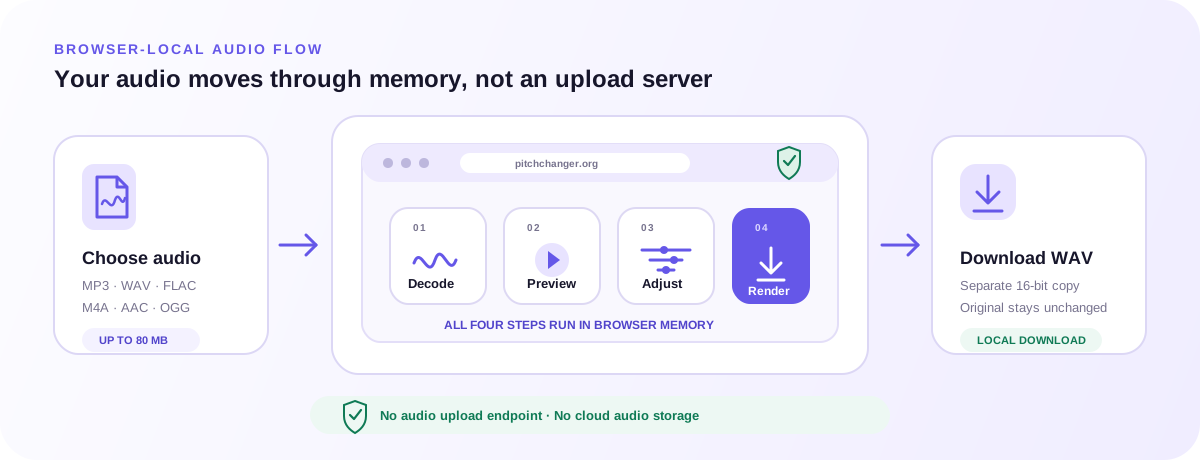
Browser-local audio speed changer workflow from file selection through decode, pitch-locked preview, speed adjustment, and WAV download
The audio speed changer decodes, previews, stretches, and renders inside browser memory; only the WAV you request becomes a download.

Supported input formats and browser decoding

The picker accepts MP3, WAV, FLAC, M4A, AAC, and OGG up to 80 MB. Decoding support ultimately comes from the browser and operating system, so a valid extension cannot guarantee every codec variant will open. The audio speed changer reports a decode failure and lets you choose another file instead of sending the problem file to a server.

16-bit WAV output with matched processing

The first release exports one 16-bit WAV. Live preview and offline rendering both use Signalsmith Stretch with rate set from the visible speed and semitones fixed at zero. The audio speed changer does not recreate the original compressed codec, claim bit-for-bit preservation, or offer MP3, M4A, FLAC, AAC, and OGG export options.

Browser-local audio and private working state

Selected audio bytes are decoded, previewed, stretched, and rendered in browser memory. The current audio speed changer has no audio upload endpoint, account, cloud project, payment step, or usage-credit system. Analytics receive only coarse tool actions and never receive the filename, audio content, exact duration, BPM values, waveform, or speed setting.

FAQ

Direct answers about the audio speed changer, browser support, local processing, controls, WAV export, and the limits to check before you begin.

What is an audio speed changer?

An audio speed changer adjusts playback rate and duration. This tool keeps pitch fixed across its 50–200% range.

Can the audio speed changer slow a song without lowering pitch?

Yes. At 80%, the recording lasts about 1.25 times as long with its original pitch setting. Preview for time-stretch artifacts.

Can the audio speed changer make audio faster without raising voices?

Yes. Set speed above 100%; pitch stays locked. Check that fast speech remains intelligible.

How does the audio speed changer BPM calculation work?

It divides your target BPM by the original BPM and converts that ratio to a percentage. Both values must already be known.

Does the audio speed changer detect BPM automatically?

No. The BPM fields calculate a speed from your inputs; they do not analyze or verify the recording’s tempo.

What audio speed changer range is available?

50–200%, using the slider or exact number. Out-of-range BPM calculations show an error without changing the rate.

Is the audio speed changer free and does it require sign-up?

Yes. No sign-up or payment is required. Working sessions are not saved after you close the tab.

Does the audio speed changer upload my file?

No. Audio stays in the browser. Coarse analytics exclude filenames, audio, duration, BPM, waveform, and processing settings.

Which file formats can the audio speed changer open and download?

Open MP3, WAV, FLAC, M4A, AAC, or OGG up to 80 MB with browser codec support. Export is 16-bit WAV without source tags.

Why is the exported WAV longer or shorter?

Output duration equals original duration divided by speed ratio, with minor frame-rounding or processing differences. Check the estimate before export.

What is the difference between this page and the Pitch Changer?

Audio Speed Changer keeps the original key. Pitch Changer also lets you transpose and fine-tune while adjusting tempo independently.

Can I process several files, record audio, or import a URL?

No. Choose one local file at a time. Batch processing, recording, URL imports, cloud storage, and background jobs are unavailable.

Start with a modest speed change and preview the difficult passage before creating your WAV.

Open the audio speed changer